How to set up your AI to write thought leadership content (that’s actually good)
The key to creating good first drafts with AI is to give it plenty of context. But instead of repeatedly writing lengthy prompts, let’s get you set up with re-usable context in the form of an AI Project.
You know you should be publishing thought leadership content. And with AI promising to make writing faster and easier, you believed you'd finally found a way to make it happen.
So you opened ChatGPT, asked it to write an article about something you know inside out, and waited for the magic.
What came back was likely something technically correct, reasonably well-organized (albeit with too much repetition), and completely forgettable. It sounded like every other article on the subject. It didn't reflect your experience, your opinions, or the way you approach your work. And it certainly wasn't something you'd feel proud to put your name on.
As Phil Symchych, a financial strategy consultant for B2B companies with $3M–$50M in annual revenue, told me:
“When I tried to write long-form content with AI, it was barely interesting and fairly bland."
It's frustrating, especially when you feel behind with AI and everyone else seems to be getting so much out of it.
But without a strong body of thought leadership content, you're missing opportunities to build trust and turn interested leads into clients. It helps you fill your pipeline and grow your business even when you're not in the room. It gives prospective clients a way to get to know your thinking, helps your supporters make the case for hiring you, and makes it easier for people to refer you.
I want to reassure you that AI can help you create thought leadership content more efficiently.
The trick is understanding what AI needs from you to produce something worth publishing.
In this article, I'll share three problems with using AI to develop thought leadership content, and show you how to overcome them. I'll also show you how to bring everything together so you don't have to start from scratch every time you want to write something.
1. AI doesn't know what you do
AI-generated thought leadership tends to be thin and generic because it doesn't know what you do or why it's valuable to your clients.
You might have spent 20 years helping companies solve a particular type of problem. But when you ask AI to write an article about your area of expertise without giving it enough background information about what you do, it relies on what it already knows, which is drawn from what’s already out there on the internet (and in the material it was trained on).
The result may be a reasonable summary of conventional practices. But you have more to offer than “conventional practices,” so any content AI writes for you is either too generic to be usable or you have to spend a lot of time re-writing parts of it to make it fit your business. The fix is to make sure AI knows from the get-go how to generate content that’s specific to your business. But it’s a pain in the butt to manually tell it about your business every time you sit down to write something.
The solution is to create a Business Profile document that you get AI to refer to every time you use it to write content for your business.
Get AI to interview you about your business and create a Business Profile document
Give AI a list of questions and tell it to ask them one at a time. Instruct it to ask follow-up questions rather than accepting your first answer. This pushes you to go beyond the surface level, which ultimately helps deepen your content.
Use this prompt, adapted as needed:
I want you to create a Business Profile document that I can use for different projects inside an AI tool. To create the doc, I'd first like you to ask me these questions one at a time and ask follow-up questions as needed to push me to be more specific or clear.
You can then give AI this list of questions, removing any you want, and adding others:
Overall, in plain language, what does your business do?
What services do you offer? What does each one include, and what does it not include?
What in your background and experience makes you credible on this?
What are clients typically struggling with before they engage you?
What transformation are you helping clients achieve?
What do you do differently from others in your field?
What principles or beliefs guide your work?
How does an engagement work, from first call to finish?
How are your engagements priced?
Who’s your ideal client (including industry, company size, and role)?
Who’s a bad fit for you, and why?
What results have clients gotten? Give specifics.
The more specific your Business Profile document is, the more useful it becomes.
For example, my own Business Profile document says this about the problems my Thought Leadership Signature Collection clients have:
The problem clients have
Leads reach the consultant's website, find too little there, and leave without booking a discovery call. A bio and a service page do not answer their questions or give enough detail. Those leads never enter the consultant's pipeline and are never nurtured.
The wider situation
• The consultant gets busy with client work and neglects marketing.
• They are well paid for their work, but their income is uneven.
• They worry there are not enough clients coming through the pipeline.
• They rely heavily on referrals, which are unpredictable and do not feel secure.
• Referrers have nothing concrete to pass along when they recommend the consultant.
Why they have not fixed it
• They have not recognized the gap. They see thought leadership as a nice-to-have, not as a way to nurture leads into the pipeline.
• They do not know what to write about or how to write it.
• They are short on time.
• They have tried AI to save time and gotten lacklustre, generic results.
Note that I haven’t bothered to fix the robotic tone of my Business Profile. Since only robots are going to read it, it doesn’t matter.
When you use your Business Profile as context when creating a specific piece of content, AI has a much stronger foundation for helping you produce articles that reflect what you actually do.
2. AI doesn't know what your potential clients need to hear
The next big bit of context AI needs is information about what your prospective clients need to understand before they'll hire you. This is part of what helps you win business, rather than just producing general information articles.
Your readers aren't necessarily interested in everything you know about your subject. They're interested in the problems they're facing, the decisions they're trying to make, and the questions they need answered. Some may not even understand the real cause of the problem they're experiencing; they just feel the symptoms. Others may recognize they need help but have misconceptions about the kind of help they need, what your process involves, or what results are possible. And still others are skeptical you can even help at all.
Your content needs to meet them where they are. So, alongside your Business Profile document, you also need a Buyer Context document to help keep your AI tool focused on content that your prospective clients need.
This document will be more useful than a traditional marketing persona. It doesn’t matter whether your ICP (ideal customer profile) has two kids or four or none, whether they drive a Subaru or Honda. What matters are the problems and questions they have that are related to buying from you. This document will guide your AI towards topics for content creation that address real questions and concerns your clients have.
Give AI the questions and objections your buyers actually have
On discovery calls, you’ve probably noticed repeated misunderstandings prospects have about your work, common concerns and hesitations about working with you, and the triggers that finally prompt them to realize they need your help. Write those down.
There are probably many other questions you hear repeatedly (either out loud or between the lines). For example:
Can't our existing team handle this?
How is your approach different from what we've already tried?
Why is your approach better than other consultants we could hire?
How long will it take before we see results?
What will you need from us?
How do we know this will work for a company like ours?
Will the results persist after the engagement has ended?
All these questions are valuable clues about what your thought leadership should cover to help move leads closer to becoming buyers.
For me, the questions I need to address in my content are things like:
How can I write about my work when I’ve signed NDAs?
What’s the point of nurturing leads with thought leadership if I get leads through referrals?
How do I use AI to save time but avoid AI slop? [That’s this article!]
What should I write about?
What’s the process when working with you and how long will it take?
What will I actually get at the end of the engagement?
How do I know if thought leadership content will work for me?
Do I need to write thought leadership blog articles frequently, regularly, or indefinitely?
You can either push yourself to go deeper and to keep asking why, or have AI interview you to do this. If you use AI, give it the actual questions and objections you've heard — and ask it to help you identify the beliefs or concerns behind those questions. Either way, keep asking why and aim to go as deep as possible.
For example, in the case of solo consultants who are good at the work they do, but worried about their patchy pipeline, if I push to ask why they’re worried about that, the answer could be based on financial security, but there’s another, even deeper possibility: That they’re worried that although they’re good at the consulting work they do for clients, they might not be successful at running a consulting business. And for an ambitious consulting business owner, that’s an anxiety-inducing place to be. They’re used to being successful; it’s maybe even part of their identity. And they dread having to go back to corporate, just to get financial stability. To them, that would feel like failure.
All this information will go into your Buyer Context document.
Capture voice-of-customer information
It’s also useful to add what’s called voice-of-customer information to your Buyer Context document. The purpose is to capture what your prospective clients care about, in their words.
You can gather this information from discovery call notes, sales conversations, client interviews, and questions people ask you at conferences or networking events. (I would anonymize anything private before uploading to AI tools. Even though my privacy is set not to share my stuff to improve AI models, my level of trust just isn’t high enough. See the Appendix for how to set yours up the same way.)
Here are some made-up examples of what voice-of-customer information might include for a financial strategy consultant:
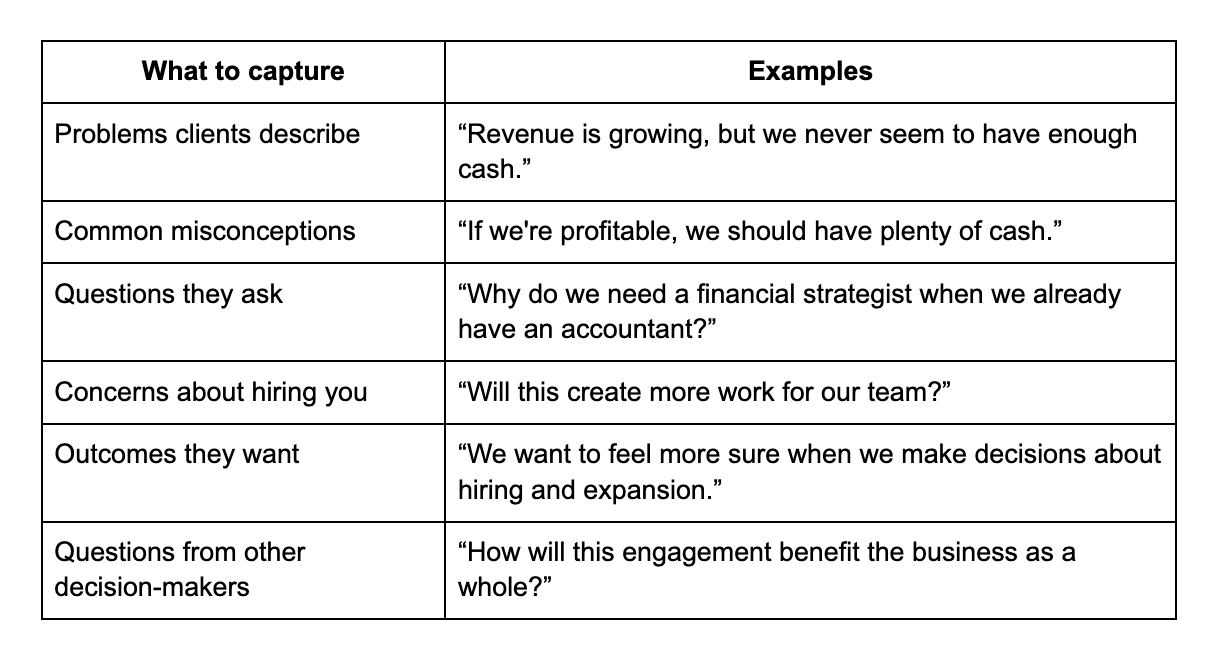
Notice that, although you have a basic description of your ideal client in your Business Profile document, the Buyer Context document goes deeper and gets much more specific. A classic principle of copywriting is that you use the customer’s language in your marketing material so they feel heard, almost as though you read their mind. When you “speak their language” it helps your potential clients feel that you “get them”.
This is how you publish content that supports your sales process. Your articles are meant to be helpful to both the reader and your business. They can help prospective clients understand their problems better, recognize the value of your approach, and feel more confident about taking the next step and booking a discovery call.
Once you’ve got the detailed information about your potential clients’ questions etc. and also the voice-of-customer info, tell AI to put it together into one Buyer Context document.
Here’s a prompt you can use (edit as needed) to do the tasks in this section with AI:
I want you to create a Buyer Context document that I can use as a reference when writing thought leadership content. I've attached my Business Profile document for background.
Work in three stages, and wait for me at the end of each one.
Stage 1: I'll paste the questions, objections, and misunderstandings I hear from prospective clients. For each one, ask me why I think they're asking it, and keep asking why until we reach the belief, worry, or fear behind it. Ask one question at a time. If my answer is vague, push me to be more specific. Then ask me what else I hear that isn't on my list, including what finally prompts people to look for help.
Stage 2: I'll paste or upload notes or transcripts from real conversations with clients and prospects. Pull out the exact words they used for: the problems they describe, their misconceptions, the questions they ask, their concerns about hiring someone like me, the outcomes they want, and questions from other decision-makers. Quote them word for word. Don't paraphrase, tidy up, or invent quotes. If I give you a phrase from memory, mark it as remembered. If there's nothing for a category, leave it empty and tell me.
Stage 3: Combine everything into one Buyer Context document, organized by question or concern. For each one, include the belief or worry behind it and any matching quotes. Don't add anything I haven't told you or that isn't in the material I gave you. Finish by telling me where the document is thin, so I know what to listen for in future conversations.
3. AI doesn't know how you communicate
There's a third problem to solve: the finished article needs to sound like you.
If, when you read your draft, you find yourself thinking, "That’s true, but I’d never put it that way," that's a problem. One of the goals of your thought leadership is to help people develop confidence in you. If your articles don’t express your you-ness, then prospects aren’t really getting to know you. It’s like talking to someone from the other side of a wall. Also, your voice is part of what makes you distinctive, different from your competitors. Of course, you could solve this by writing everything yourself from scratch, with no help from AI. But we’re here to find the right balance between efficiency and authenticity.
Create a voice guide from your own writing
It’s hard to describe how we naturally write. Just telling AI “Write in a conversational tone and avoid jargon” doesn’t give it much to go on.
You need to give AI examples of things you’ve written. Obviously, they need to be things you’ve written without the help of AI, otherwise you defeat the purpose. These can be articles you’ve written, emails, LinkedIn posts, presentation transcripts, or other material that reflects your natural communication style. You can also give it examples of your verbal style by giving it transcripts or just by talking to it.
Choose examples you feel good about. And maybe don’t include the ranty emails you sent your best friend after half a bottle of wine. We’re looking for the “business” version of your voice. You can still be authentically you, even though you’re adjusting your voice to the room you’re in.
Then ask AI to analyze the material and identify patterns in how you communicate.
For example:
Do you use short, direct sentences or develop ideas in longer explanations?
Do you tend to be conversational or more formal?
How do you introduce a problem?
How do you explain complex ideas?
How, if at all, do you use humour?
Do you use analogies, stories, or concrete examples?
How do you express disagreement or challenge conventional advice?
What words or phrases do you use frequently?
Ask AI to turn those observations into a written voice guide.
Review the guide and remove anything that doesn't feel accurate and add anything important that's missing. Also, include words and expressions that you don’t like and never use. For example, I’d never use the word synergy and I generally avoid violent metaphors (like bring a gun to a knife fight). They’re just not my thing. In fact, I tell my AI to write ‘straight’ with no metaphors and analogies at all. This is partly because AI tends to use them whether they’re helpful or not, and also because it’s some of the personality seasoning I like to add myself, directly from my own brain. (See, personality seasoning was my own invented term. That’s an example of exactly what I mean.)
The first time I had ChatGPT analyze my writing style (mostly from emails and Facebook posts I’d written), I was blown away and really felt “seen”, as they say. I had it turn the insights into a brand voice guide for Facebook, Instagram, and my fiction-related newsletters, not my business/LinkedIn voice.
This is a different voice from my business voice, but both are distinctively mine. (In my own case, creating that voice guide was an experiment, and I don’t actually use it with AI. I just write my fiction-related content myself because it’s fun and easy for me. And I never use AI to write fiction. That’s a hard nope. I explain why in this post.)
Here are a few things that first guide included:
Humour appears through:
understatement
contrast
observational detail
dry phrasing
The tone avoids:
forced jokes
excessive sarcasm
internet-style snark
The humour feels human rather than performative.
Elevated + ordinary contrastOne of the strongest recurring stylistic patterns is the juxtaposition of:
emotional/philosophical reflection
withordinary real-life details
Example:
historical memory ↔ Cadbury’s mini eggs
grief ↔ cat diarrhea
literary ambition ↔ rejection trackingThis gives the writing dimensionality and warmth.
Conversational clause chaining
Example structure:
“the cats were sick and the oven broke and…”
This mirrors spoken storytelling and creates momentum.
You can give AI access to your voice guide whenever you're developing new content.
Instead of repeatedly telling it to "make this sound more like me," you'll have a more specific way to explain what that means.
Use an anti-AI style guide
I mentioned that it's also useful to document what you don't want your writing to sound like and some of this has nothing to do with AI. There might be certain words or expressions you can’t stand and you should put those in your voice document. However, there are also plenty of AI-isms you’ll want to avoid, which go beyond over-use of em-dashes and the “It’s not x, it’s y” sentence structure.
There are a lot of AI-isms and, unless you read a crap ton of online content, you may not even be aware of all of them — but your readers might be. (Why should we care about AI-isms? I don’t think the problem is that people can ‘spot’ you’ve used AI. Why should anyone care if you have or haven’t? I think the problem is that, fairly or not, over-used AI-isms give the impression of lazy writing and lazy thinking. That’s why we want to eliminate them.)
Instead of creating my own guide from scratch I just adapted one that Ruben Hassid created and update it every now and again when I start noticing a new AI-ism. For example, when I noticed a surge in references to Tuesday.
Click here if you’d like me to email you a copy of my anti-AI style guide (for free, no catch).
How to bring everything together
You now have four documents that address the main reasons AI-generated thought leadership tends to fall short.
1. Business Profile document: Helps AI understand your expertise, approach, beliefs, and the problems you solve and for whom.
2. Buyer Context document: Helps AI understand what prospective clients need to know, the questions they're asking, and the concerns that may prevent them from hiring you — in the language they use.
3. Voice guide: Helps AI communicate your ideas in a way that reflects your natural writing style.
4. Anti-AI style guide: Helps AI avoid the generic language and writing habits that make articles feel artificial or lazy.
These documents are useful individually, but they become much more valuable when you use them together.
Rather than uploading them separately every time you want to write something, you can create a dedicated AI project for your thought leadership content.
Set up a project with your reference documents
If you use ChatGPT, Claude, or Perplexity, you can create a Project specifically for developing your thought leadership. The same thing is called a Notebook in Gemini. Here, I’ll continue to refer to Projects and give instructions for the two most popular tools, ChatGPT and Claude.
(These tools change fairly frequently so, if by the time you read this, my screenshots don’t match what you see on your screen, let me know and I’ll update them!)
Here’s how you create a Project in ChatGPT:
1. In ChatGPT’s left sidebar, hover near Projects and click the plus sign that appears.
2. In the pop-up window, give your Project a name (e.g. Thought Leadership). Here you can also choose the type of memory the Project has: Project-only or access to chats outside the Project.
Here’s how to create a Project in Claude:
1. In Claude’s left sidebar, click on Projects. The window then shows all your Projects together. Click the top right New project button.
2. In the pop-up, name your Project (e.g. Thought Leadership) and click the Create project button.
3. Open your new Project, click on View memory on the right hand side. In the pop-up, you can choose the type of memory you want for that Project.
What memory type should you use for your new Project? This will depend on how you use your AI tool.
When you’re working inside a Project, the question is whether you want your AI to ‘remember’ and access chats that happened outside of a Project. Your choice is especially important if you use Projects for client work. In that case, you’ll want each client Project to be restricted to the memory inside that specific Project.
It also matters if you want to keep your business self separate from, say, your uber-sarcastic, beer-loving, dirt-biking self. If you have a Project that you use for your sarcastic posts on your beer-focused Instagram account, you’ll want to keep that separate from your business work. So, you’ll want memory to be restricted to chats inside that Project.
But if you use your AI tool only for your own business and not for other purposes, then it might be more convenient for your AI to remember chats outside of your new Thought Leadership Project. It’s your call.
If you’re not sure, default to restricting memory to Project-only.
Inside each Project, there’s a space to put instructions for that specific Project. Here’s where to find it in ChatGPT:
1. Once your Project exists, hover near its name in the left sidebar and click the three dots. In the pop-up menu, choose Project settings.
2. In the pop-up window, paste the instructions for the Project in the space for them.
And here’s where you find the place to put instructions for a Claude Project:
When inside a Claude Project, click the pencil icon next to Instructions on the right hand side. Then you can paste your instructions into the window that pops up.
Here are some instructions you can use for your new thought leadership project:
You are helping me develop thought leadership articles that demonstrate my expertise and help prospective clients understand the value of working with me.
Use the Business Profile document to understand my business, expertise, clients, approach, beliefs, and the problems I solve.
Use the Buyer Context document to identify the questions, concerns, and misconceptions my content should address. Also, where appropriate, use the specific language my customers use.
Follow my voice guide and anti-AI style guide when helping me develop and edit articles.
Do not invent my opinions, experiences, client stories, or results. If you need information that isn't in the reference documents, ask me.
Before creating an outline, help me clarify the main idea, the intended reader, and what I want that reader to understand or believe after reading it.
Get my input on the outline before drafting the article.
Challenge vague arguments and identify where I need to provide more detail, evidence, or examples.
Help me create content that is specific, useful, and recognizably mine.
Now you have a dedicated space where AI will have access to the background information it needs to be a more useful writing partner. Now you just need to upload your four documents to your new Project. In the last Claude screenshot above, you can see Context on the right hand side, under Instructions and Memory. You click the plus sign and upload your docs.
Here’s how you upload the documents to a Project in ChatGPT:
1. Click the three dots next to the Project name in the left sidebar, then choose Project home.
2. Choose Sources underneath the chat window and then click the Add sources button.
You can update the documents if and when your business changes in any way, you learn more about your buyers, notice new AI-isms, or get clearer on your own preferred writing style.
And because they're part of the same Project, you don't have to keep explaining the fundamentals of your business, clients, and communication style every time you want to write something new. You just start a chat inside your Thought Leadership Project whenever you start working on a new article and the AI knows to reference your documents.
Although it takes some time upfront to get the project set up with the documents, in the long run, you save time because the AI-generated drafts will be much more usable and require less editing.
(Once you’ve gotten everything set up inside a Project, how do you go about writing an article? I address this question in a separate blog post.)
Want help setting this all up? Start by booking a Foundation Call.
After a Foundation Call, I’ll give you detailed, step-by-step instructions for how to create the documents I talked about above, so you’ll be good to go to set up your AI project to write your thought leadership articles by yourself (the DIY option). I also give you the topics that you should write about to help move your leads closer to buying and booking a call with you.
Alternatively, I offer a Done With You service, where I give more hands-on help, accountability, and feedback on your articles. With the Done For You option, I ghostwrite them for you — of course, based on interviews and other input from you.
Appendix: Privacy settings
Here’s how you set your privacy in ChatGPT:
1. Click on your name in the bottom left and then choose Settings in the pop-up menu.
2. Select Data controls on the left and then toggle off Improve the model for everyone. This means your content won’t be sent to OpenAI, the company that owns ChatGPT. Nevertheless, I’d anonymize anything private.
And here’s how you set the privacy in Claude:
1. Click on your name in the bottom left and then choose Settings in the pop-up menu.
2. In the pop-up window, choose Privacy in the left side menu and toggle off Help improve our AI models. This means the content of your chats won’t be sent to Anthropic, the owner of Claude. Again, I don’t completely trust it, and I’d anonymize anything sensitive.